Quick answer
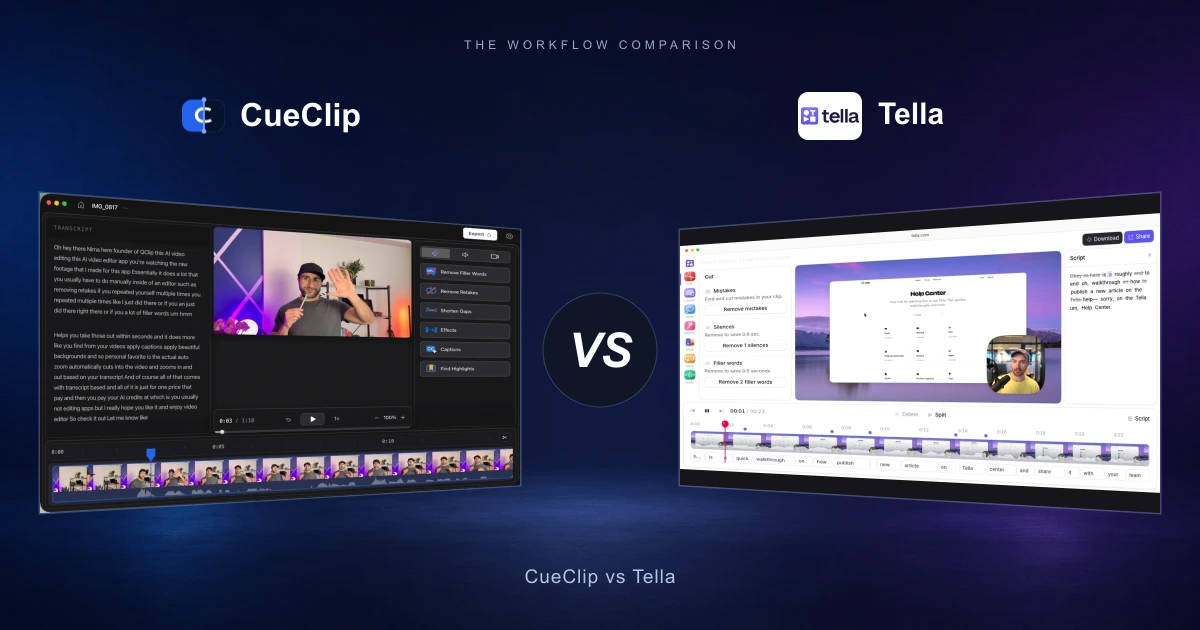
Tella is built around recording in clips and publishing them from a branded share page, with AI that strips filler words and silences. CueClip is built around the edit itself: you fix a long take by editing its transcript, it finds and cuts your retakes, and it exports locally — MP4, captions, or FCPXML for Final Cut, Premiere and DaVinci. If you re-record until a clip is clean, Tella fits. If you talk for forty minutes and fix it afterwards, CueClip fits.
CueClip vs Tella: What matters for course creators
Tella's core idea is clever: don't edit, re-record. A session is a string of clips that stitch together automatically, so when you fumble a line you redo that clip instead of cutting around the mistake. For demos, pitches and onboarding videos — anything short and segmented — that removes most of the reason to open an editor at all.
The idea stops scaling at lecture length. A forty-minute module is not six clean clips; it is one long take with a dozen false starts, a few sentences you said better the second time, and a running tax of ums and three-second pauses. Re-recording a clip of that size is not a fix, it is doing the lesson again.
So the real CueClip vs Tella question is where your mistakes get handled. Tella handles them at record time, and hosts the result on a branded page with analytics. CueClip handles them after the fact, on the transcript, and hands you a file — which is what you need when the video goes to Udemy, Kajabi, Maven, YouTube or a client, rather than to a share link.
What Tella does well
Tella is a recorder and a publishing surface. It runs as a Mac app (macOS 13.1 or later), in the browser, and as a Chrome extension, records screen and camera in clips, and finishes in its web editor with backgrounds, zooms, transitions and AI cleanup of filler words and silences. Paid tiers add 4K export, custom branding, a custom domain and viewer analytics. There is no forever-free plan — accounts start on a 7-day trial, and Pro runs about $19/month with annual billing discounted, Premium about $49/month.
Where Tella is stronger
- Clip-based recording: redo a fumbled segment instead of editing around it
- Branded share pages, custom domain and viewer analytics on paid tiers
- Works in the browser and on Windows machines, not just macOS
- Backgrounds, zooms and transitions applied at record time with little setup
- Strong fit for demos, pitches, onboarding and sales videos

Where CueClip is stronger for long-form lessons
CueClip is a native macOS editor that also records. After capture or import, the transcript is the edit surface: delete a sentence and the video loses it, highlight a passage and export just that piece. It finds repeated lines and keeps the best take, cuts filler words, shortens dead air to a length you set, burns in captions, and exports on your own machine — so a 4K master never depends on an upload finishing.
Where CueClip is stronger
- Transcript-first editing on a single long take, no re-recording required
- Retake detection: finds repeated lines, keeps the best, queues the uncertain ones for review
- Spoken retake cues — say “retake” or “one more time” and CueClip splits the take there
- Edits and exports locally, so nothing is uploaded unless you choose a share link
- FCPXML out to Final Cut Pro, Premiere Pro and DaVinci Resolve with your footage untouched
- Captions burned in exactly as previewed, plus standalone .srt/.vtt including translated
- Drive the editor from Claude or ChatGPT over MCP
- $199 once or $29/month, with bring-your-own OpenAI, Claude or Deepgram key
Feature differentiation table
This is the practical side-by-side view for people comparing Tella alternatives, CueClip pricing, and long-form course editing outcomes.
| Capability | Tella | CueClip |
|---|---|---|
| Primary job | Record in clips, publish a branded page | Repair a long take, export a file |
| Platform | Mac app (13.1+), browser, Chrome extension | macOS desktop app |
| Where editing happens | Tella's web editor | Locally, on your Mac |
| Fixing a mistake | Re-record that clip | Delete the words in the transcript |
| Transcript-first editing | Available in the editor | Core workflow |
| Filler word removal | Yes, AI cleanup | Yes, every cut reviewable |
| Retake detection | Not the model — you re-record instead | Finds repeats, keeps the best take, flags the unsure ones |
| Spoken retake cues | No | Say “retake” to split the take |
| Gap and silence cleanup | Yes, AI silence removal | Yes, trimmed to a length you choose |
| Background noise removal | Not the core use case | Built in, with voice enhance |
| Captions | In the editor and player | Burned in as previewed, plus .srt/.vtt and translated |
| Zooms | Applied in the editor | Auto-zoom on cursor and content, plus manual, with motion blur |
| Camera treatment | Backgrounds and framing presets | Background removal, pop-out framing, layout and shape |
| Hand off to an NLE | Not the workflow | FCPXML to Final Cut, Premiere, DaVinci |
| Sharing | Core feature: branded pages, custom domain, analytics | Share links, 30 days on a paid license |
| AI assistant control | No | MCP: drive the editor from Claude or ChatGPT |
| Pricing model | Subscription only, 7-day trial, no free plan | $199 lifetime or $29/month |
Pricing and ownership comparison
For educators shipping every week, pricing model and ownership matter as much as features. This is where many creators start searching for a tella alternative in the first place.
| Decision factor | Tella | CueClip |
|---|---|---|
| Base pricing pattern | Pro around $19/month, Premium around $49/month, annual discounted | CueClip: $199 lifetime or $29/month |
| Free option | 7-day trial, then paid | Trial, then lifetime or monthly |
| AI cost | Bundled into the tier | Included credits, or bring your own OpenAI, Claude or Deepgram key at cost |
| Cost after the course ships | Keeps billing while you publish | Lifetime: nothing further |
| Ownership | Videos and editor live in Tella's cloud | Footage, project and exports stay on your Mac |
| Best economic fit | Teams publishing short branded videos continuously | Creators shipping long lessons they sell elsewhere |

Why creators switch workflows
- Re-recording a clip is cheap at two minutes and expensive at forty — long lessons need cutting, not retakes.
- Course platforms want a file. A branded share page does not upload to Udemy, Kajabi or YouTube.
- Retakes are the slowest part of lecture cleanup by hand, and the part Tella expects you to avoid by re-recording.
- Editing in a web editor means your footage lives in someone else's cloud and your export waits on an upload.
- A subscription with no lifetime option keeps charging after the course is finished and selling.
Re-record or repair: picking by how you actually talk
Tella's clip model rewards people who speak in takes. If you naturally stop, judge the clip, and go again, you will finish a short video in Tella faster than in any editor — including this one. Nothing to cut means nothing to review.
It punishes people who speak in flow. Teaching, interviews, walkthroughs and anything over about ten minutes come out as one long imperfect take, because stopping to judge every paragraph destroys the thread you are holding. That take needs repair, and repair is transcript work: read what you said, delete the parts you did not mean, keep the better of the two times you said the same thing.
CueClip is built for the second case. Auto Edit runs filler removal, retake cutting and gap shortening in one pass and lists every cut with the words around it, so you review decisions rather than hunting for mistakes. When it is not confident a line is a retake, it refuses to cut and puts it under Retakes to Review, one at a time with the playhead parked on each. You can also mark bad takes while recording by saying “retake” or “one more time” out loud — CueClip treats the phrase as proof of where a take ends and numbers the takes for you.
The other split is where the video goes. Tella's output is a page: branded, analytics-tracked, on your own domain if you pay for it. CueClip's output is a file: MP4 at 4K or 1080p, only the part you selected in the transcript if that is all you want, .srt or .vtt on the side, or FCPXML if a human editor finishes the job in Final Cut, Premiere or Resolve. CueClip does have share links — 30 days on a paid license — but they are a convenience, not the destination.
On money, the shapes differ more than the numbers. Tella is a subscription for as long as you publish, with AI bundled into the tier. CueClip is $199 once (30,000 AI credits included) or $29/month (20,000 credits a month, roughly 20 hours of video), and you can point it at your own OpenAI, Claude or Deepgram key so the AI stays at cost no matter how much you record.
Who each tool is for
Tella: Short, segmented videos published on a branded page with analytics.
CueClip: Long single-take lessons that need cutting and ship as files.
Other Tella alternatives worth considering
CueClip is not the only option. Depending on what you make, one of these may fit better than either tool above.
| Tool | Best for | Platforms | Pricing model |
|---|---|---|---|
| Loom | Quick async record-and-share | Mac, Windows, web, Chrome | Free tier (25 videos, 5 min each) + per-seat plans |
| Screen Studio | Short, polished Mac product demos | Mac only | Subscription |
| Descript | Transcript editing with a broad media suite | Mac, Windows, web | Subscription + monthly AI credits |
| Camtasia | Screen-recorded training with quizzes and SCORM export | Mac, Windows | Annual subscription |
FAQ: CueClip vs Tella
What is the main difference between CueClip and Tella?
Where mistakes get fixed. Tella records in clips, so you redo a clip when you fumble, and publishes the result on a branded share page. CueClip assumes one long imperfect take and repairs it afterwards by editing the transcript — cutting filler words, retakes and dead air — then exports a file.
Is CueClip a good Tella alternative for course creators?
Usually yes, if your videos are long and sold elsewhere. Lectures do not come out as clean clips, and course platforms want an MP4 rather than a hosted page. If your videos are short demos that live on a branded link with analytics, Tella is the better fit and CueClip is not trying to replace it.
Does Tella have a lifetime plan?
No. Tella is subscription-only — accounts start on a 7-day trial, then Pro or Premium, billed monthly or annually. CueClip offers $199 once for a lifetime license as well as a $29/month plan.
Does CueClip work in the browser or on Windows?
No. CueClip is a native macOS app, which is why editing and export run on your machine rather than in a cloud renderer. Tella works in the browser and on Windows, so if you are not on a Mac, that part of the comparison is decided.
Can CueClip handle retakes without re-recording?
That is the thing it is built for. It finds lines you said more than once and keeps the best take. When it is not confident, it does not cut: the suggestion goes under Retakes to Review, one at a time, with the playhead on it so you can hear it first. You can also say “retake” or “one more time” while recording to mark a bad take out loud.
Can I keep using Tella for sharing and CueClip for editing?
Yes, and some creators do. Record and publish short videos in Tella, and run long lessons through CueClip, exporting an MP4 for the course platform or FCPXML if someone else finishes the edit.
Related comparisons and guides
- CueClip vs Screen Studio
- CueClip vs CapCut
- CueClip vs Loom
- CueClip vs Opus Clip
- How to Edit Course Lectures Fast
- Best Auto-Edit Tools for Course Creators (2026)
- CueClip pricing
Final verdict
Both tools are strong when matched to the right workflow. If your priority is long-form educational editing speed with transcript-led cleanup, CueClip is usually the better fit.